


RoadReady
3.32.39K Reviews
App Specs
- Version
- 3.4.13
- Updated On
- License
- Free
- Downloads
- 500,000+
- Developer
- Safe Roads Alliance, Inc.
- Categories
- Education
- Platform
- Android
Screenshots
 Analysis by AppCompare
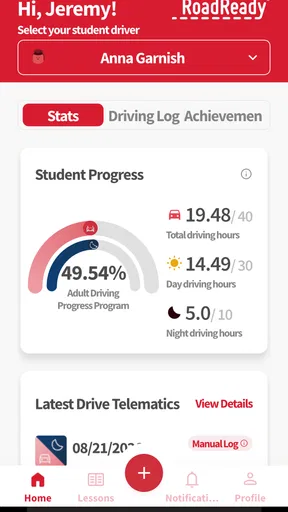
Learning to drive is full of small moments that are easy to forget: the quiet trip around the neighborhood, the awkward first attempt at parking, the longer drive where a parent finally lets you handle more of the route. RoadReady is designed to turn those practice drives into a record you can actually follow. I found its main value less in teaching driving theory and more in giving the learner and supervising adult a shared way to see how practice is progressing during the learner’s permit stage.
That distinction matters. This is an education app, but it is not a replacement for an instructor, a driving manual, or careful supervision. It works best as a companion to real driving practice. If you want a simple place to log experience, identify gaps, and make the next session more purposeful, it is worth considering. If you are looking for interactive lessons, simulated driving, or a complete preparation course for a written exam, you will probably need another tool alongside it.
What to expect before you begin
RoadReady comes from Safe Roads Alliance, Inc., and its focus is narrow in a useful way: recording teen driving practice while the learner is working toward greater confidence and experience. The app is free and rated for Everyone, which makes it easy for a family to try without treating the first installation as a financial commitment. It has passed the half-million-install mark, and its average rating is 3.3 from roughly 3,600 ratings, with about 2,400 written reviews. I read that combination as a sign that the concept is useful to many people but that the experience may not feel equally smooth for every family.
The first thing I would adjust is my expectation of what “logging practice” means. The purpose is not to make a drive feel like a game or to judge whether someone is ready for a license. Instead, the record can help answer practical questions: Have we practiced at night? Has the learner driven in rain? Are we repeating easy neighborhood routes while avoiding busier roads? Are we spending enough time on parking, turns, lane changes, or other skills that still feel uncomfortable?
That makes the app especially helpful when practice is shared between several adults. A parent may remember yesterday’s drive, while another family member may not know what has already been covered. A consistent record gives everyone a common reference point. It can also make conversations less vague. Rather than saying “you need more practice,” a supervisor can look back and decide that the next drive should focus on one specific situation.
There is also a useful emotional benefit. New drivers often feel that every drive is either a success or a disaster, depending on one difficult moment. A practice log gives a broader view. A drive that included a missed turn may still have been valuable if the learner handled traffic calmly, checked mirrors consistently, or completed a new type of route. I like that this encourages progress to be measured over time rather than by one tense trip.
Still, I would not use the record as proof that someone is prepared to drive alone. Logged practice can show exposure and repetition, but it cannot capture every decision made behind the wheel. A learner might record a drive accurately and still need much more coaching in a particular skill. The safest approach is to treat RoadReady as an organizer for supervised practice, not as an authority that grants confidence or permission.
Worth Reading Before You Choose

EA SPORTS FC Mobile 26 Is a Bigger Football Game, but It Takes Time

Flipboard Shows What News Apps Must Do Beyond the Feed

Switching to Android Auto Means Rethinking Your Driving Routine

Google Calendar Makes a Crowded Week Easier to Manage

Ludo King Makes the Most of the Minutes Between Plans

Baby Panda World Brings Quick Play to Modern Phones, but Its Game Library Feels Busy
Who gets the most from it
I think it is a strong fit for a teenager and supervising adult who want structure without turning every drive into a formal lesson. It is also useful for families that practice in different cars or with more than one adult, because the record can keep the process from becoming dependent on one person’s memory. A learner who likes visible progress may find the routine reassuring, especially during the early period when improvement feels slow.
It is less suitable for someone who mainly wants a theory course, road-sign quizzes, or visual explanations of traffic rules. It is also not the best choice for a driver who already keeps a detailed paper record and has a reliable system for planning practice. In that situation, the app may add another step rather than solving a real problem. The value comes from making practice easier to organize, not from replacing every other learning resource.
Setting it up without making the first drive complicated
My advice is to install RoadReady before the learner is sitting in the driver’s seat. The first setup should be treated as a planning moment, not something to rush through in a parked car while traffic waits. Keep the learner’s permit information and the supervising adult’s expectations in mind, then decide who will be responsible for recording each session. The simpler that agreement is, the more likely the log will stay current.
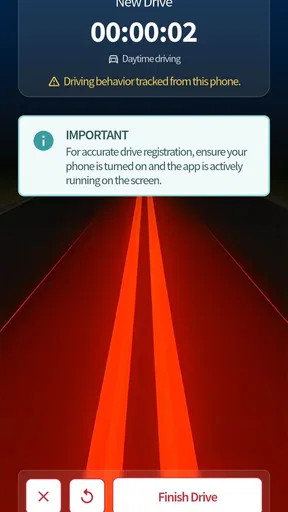
RoadReady runs on devices using at least iOS or Android 7.1, and the current version is 3.4.13. That broad compatibility is helpful for families using an older phone, although the practical experience can still depend on the device and operating system. I would update the app before relying on it for a long-term record and make sure the phone is usable without distracting the driver. The learner should never be interacting with it while the vehicle is moving.
Before entering the first practice session, decide what counts as a useful record in your household. A short drive can be worthwhile, but it should not become a meaningless checkmark. I prefer a routine in which the supervising adult chooses one main goal before leaving, such as smooth stops or controlled lane changes, and then records the drive afterward. This creates a connection between the log and the actual coaching.
A practical setup is to keep the phone with the supervising adult rather than the learner. That removes the temptation for the new driver to reach for it and makes recording a shared responsibility. If the adult is also actively navigating or managing a difficult situation, wait until the car is safely parked. A driving log is never more important than attention on the road.
I would also agree on a naming or note-taking habit before the first entry. For example, describe the session by its main challenge rather than writing only “practice.” A note such as “quiet roads with repeated turns” gives much more context when you review the record later. Even if the app keeps the main log concise, adding a consistent mental label helps turn separate drives into a training plan.
The first meaningful success
The first successful action is not simply opening the app or saving an entry. It is completing one drive and using the result to choose the next practice goal. Start with a route that is familiar enough to keep the learner calm but varied enough to reveal something useful. A short circuit with stops, turns, and a change in traffic conditions is often more informative than an easy straight trip repeated without reflection.
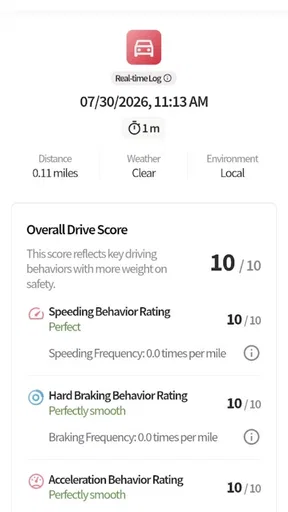
Once the car is parked, record the session while the details are fresh. Then ask two questions: What felt more comfortable today, and what created hesitation? The first answer shows progress; the second gives the next drive a purpose. This is where RoadReady becomes more than a diary. The record can help prevent the common family pattern of driving the same comfortable route while assuming that general confidence will automatically cover every missing skill.
One technique I found useful is to alternate between a familiar element and a new element. Keep the opening part of the route predictable, then introduce one challenge, such as a busier intersection or a different parking situation, before returning to a comfortable road. Afterward, log the drive and note whether the new part felt manageable, rushed, or clearly premature. This approach makes progress gradual instead of turning each session into a test.
Another useful workflow is to review the log at the end of the week rather than after every single drive. Looking at several sessions together can reveal patterns that are invisible in the moment. Perhaps the learner is practicing often but never in poor weather, or is driving for reasonable periods but avoiding unfamiliar roads. The record becomes a prompt for better variety, not a score to chase.
For a realistic everyday example, imagine a teenager who has practiced mostly after school on quiet streets. On one afternoon, the family plans a drive to a grocery store. The supervising adult chooses the route in advance, asks the learner to handle the approach, parking, and return trip, and then logs what happened afterward. The next session can focus on the one part that caused the most stress, rather than repeating the entire outing without a clear aim. That is the kind of small improvement the app can support well.
Where new users may become confused
The biggest possible misunderstanding is assuming that a completed log equals readiness. It does not. A record can show that practice happened, but the quality of supervision and the difficulty of the route still matter. I would be cautious about treating a growing total as a finish line. If the learner is consistently uncomfortable in a particular situation, that situation deserves focused coaching even when many easier drives have already been recorded.
Another point of confusion is deciding how much detail to enter. Too little information makes the record hard to use later; too much can make the process feel like paperwork. I recommend recording the essentials and one short observation. The essential part is that the session is captured accurately. The observation should explain what to repeat or change next time. A long narrative is unnecessary if it does not affect the next practice decision.
Families may also disagree about who should control the record. The learner may want independence, while the supervising adult may want accuracy. I would solve this by letting the learner participate in the review but keeping the actual phone interaction with the adult when safety requires it. The goal is not to create a contest over the log. It is to build a routine that both people trust.
It is worth remembering that an app cannot interpret the road in the same way an experienced instructor can. If a learner has trouble judging gaps, controlling speed, or responding to pressure, a written entry will not explain the underlying cause. This is one situation where professional instruction may be better than relying on family practice alone. RoadReady can help organize that practice, but it cannot observe every detail or correct technique by itself.
Technical friction can also affect the habit. Any logging app depends on people remembering to use it at the right time. If an entry is delayed for several days, details may be lost or the routine may disappear altogether. My workaround is simple: make recording part of parking the car, not part of preparing to leave. The adult can complete it after the engine is off, while the learner gives a quick spoken summary of the drive.
The app’s 3.3 average rating suggests that expectations should remain realistic. I would not dismiss it because it lacks the polish of a large driving platform, but I also would not assume that every family will find the workflow effortless. The best test is whether it reduces confusion in your own practice routine after several drives. If it becomes another chore that nobody consults, a paper checklist or shared note may be more practical.
Turning the record into the next step
After the first few entries, the most useful question is not “How many drives have we done?” but “What have we not practiced yet?” Use the record to create a balanced rotation. Include familiar roads for confidence, then add one new environment at a time: different traffic levels, unfamiliar routes, parking situations, or changing conditions when it is safe and legal to practice. The exact sequence should match the learner’s ability and local requirements.
I also recommend separating exposure from mastery. Driving through a situation once means the learner has encountered it; it does not mean the skill is dependable. If a session includes a difficult maneuver, plan another opportunity later rather than marking it complete forever. This prevents the log from giving a false sense of completion and makes the next goal more honest.
Supervisors can use the app to improve their own coaching, too. Before a drive, choose one behavior to watch instead of giving a constant stream of corrections. Afterward, record the result and decide whether the next session should repeat the same skill or move on. This reduces overload for the learner and makes feedback easier to remember. In my experience, focused coaching is more useful than pointing out every minor imperfection.
For families preparing for a licensing milestone, the record can serve as a conversation starter about readiness, but it should be considered alongside local rules, instructor advice, and the learner’s actual behavior. Requirements vary, and an app cannot decide whether a learner has met them. Keep the record accurate, avoid filling in sessions from memory just to make it look complete, and use it to support responsible decisions rather than to satisfy a number.
The developer, Safe Roads Alliance, Inc., gives the app a clear safety-oriented purpose, and that purpose is reflected in the way I would use it: quietly, consistently, and after the driving is finished. Because it is free, there is little downside to trying it with a defined plan. Give it several practice sessions, review whether the entries are helping, and stop using it if the routine adds stress without improving preparation.
My recommendation is to treat RoadReady as a practice organizer, not a driving teacher. It is at its best when a first-time driver and a trusted adult use it to turn scattered trips into deliberate practice. The first meaningful success is simple: finish a safe drive, record it accurately, identify one lesson from it, and let that lesson shape the next outing. For families who want that structure, the app can make the learner’s progress easier to see and the next step easier to choose.
Pros
- Quickly checks whether your vehicle is ready for a trip.
- Useful reminders can help prevent overlooked maintenance tasks.
- Simple checklists make inspections easier for new drivers.
- Supports safer planning before long-distance journeys.
- Can encourage regular attention to basic vehicle condition.
Cons
- Vehicle information may need to be entered manually.
- It cannot replace a professional mechanic’s inspection.
- Advice may not cover every vehicle model or local requirement.
- Some features may require an account or internet access.
- Maintenance reminders depend on accurate user-entered data.
FAQs for RoadReady
What is RoadReady, and what is it used for?
RoadReady is a driving-focused app designed to help users prepare for and manage time behind the wheel. Depending on the version and region, it may provide tools for recording practice drives, monitoring driving progress, organizing trip information, or improving road-safety habits. Before downloading, check the current store description to confirm which features are available on your device and in your country.
Is RoadReady suitable for learner drivers and supervised practice?
RoadReady can be useful for learner drivers who want a more organized way to track practice sessions and build consistent driving experience. It may help users record details such as date, duration, route, conditions, or driving goals, although the exact options can vary. The app should support instruction, not replace a qualified supervisor, official requirements, or local driving-school guidance.
Does RoadReady require an internet connection or access to my location?
Some RoadReady functions may work without a constant internet connection, while features involving maps, synchronization, cloud backups, or live information can require mobile data or Wi-Fi. Location permission may also be requested for route recording or trip-related tools. Review the permission prompts carefully, and disable location access if you do not need those features, while understanding that certain functions may then be limited.
Is RoadReady free to download, and are there any additional costs?
RoadReady’s download model, advertising, and optional paid features can differ between Android and iOS or change over time. The app may be free to install while offering subscriptions, one-time purchases, or premium tools inside the application. Before installing, review the official store listing for the current price, trial terms, renewal conditions, and whether removing ads or unlocking advanced features requires payment.
How reliable is RoadReady for tracking driving progress and safety information?
RoadReady can be a convenient way to keep driving records in one place, but its results depend on accurate user input, device sensors, GPS availability, battery level, and permission settings. It should not be treated as an official legal record unless a relevant authority specifically accepts it. Always follow traffic laws, avoid interacting with the phone while driving, and verify important information independently.


